
Download Windframe – AI‑powered Tailwind CSS prototyping tool
Overview
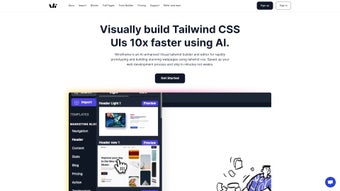
Windframe is a cloud‑based visual builder that brings artificial intelligence to Tailwind CSS prototyping. Built for developers, designers, startups, and agencies, the platform combines a drag‑and‑drop canvas with a natural‑language AI engine (Windframe AI) that can turn a simple prompt into a fully‑styled, responsive UI component in seconds. Whether you are creating a single‑page landing site, a portfolio, an admin dashboard, or a complex web application, Windframe provides a library of more than 800 professionally designed templates that can be used as‑is or customized to match your brand identity.
Real‑time preview lets you see how every change behaves on desktop, tablet, and mobile without leaving the browser. Export options include clean HTML, React JSX, and Vue single‑file components, ensuring a smooth hand‑off to your development pipeline. The entire workflow—design, code generation, and export—occurs inside a secure, encrypted cloud environment, eliminating the back‑and‑forth that traditionally slows down front‑end projects.
Because Windframe runs entirely in the browser, you always have the latest features and security patches without manual updates, making it a future‑proof choice for teams that value speed, consistency, and collaboration.
Features, Benefits, Pros & Cons
Key Features
- AI‑assisted UI creation: Generate Tailwind markup from plain‑language prompts.
- 800+ ready‑made templates: Landing pages, portfolios, dashboards, and more.
- Live responsive preview: Instantly view designs on desktop, tablet, and mobile.
- Multi‑format export: HTML, React JSX, and Vue SFC with clean utility classes.
- Custom component import: Drag your own Tailwind snippets or third‑party widgets.
- Design consistency tools: Global style settings and AI‑checked design tokens.
- Collaboration friendly: Shareable prototype links and real‑time comments.
- Secure cloud storage: Encrypted at rest and in transit with regular backups.
- Automatic updates: New templates and AI improvements appear instantly.
- Extensible widget library: Pre‑built tables, charts, and form controls for admin apps.
Benefits for Your Workflow
By automating the repetitive parts of Tailwind development, Windframe reduces design time by up to 70 %. The AI engine not only speeds up markup creation but also enforces best‑practice utility usage, which helps keep the final CSS bundle lean. The extensive template collection means you rarely start from a blank canvas, allowing you to focus on unique branding elements instead of boilerplate layout work. Exporting directly to React or Vue eliminates the need for manual code translation, so developers can immediately integrate the output into existing codebases. Collaboration features such as shareable links and inline comments cut down on email chains and version‑control conflicts, fostering a smoother hand‑off between designers and developers.
Pros
- AI‑driven UI generation accelerates prototyping.
- Large template library reduces design effort.
- One‑click export to HTML, React, or Vue.
- Real‑time responsive preview eliminates external testing tools.
- Secure, encrypted cloud storage with automatic updates.
Cons
- Requires an active internet connection; no offline mode.
- Deeply custom Tailwind configurations may need manual tweaking.
- Free tier limits the number of saved projects.
Installation, Usage & Compatibility
Windframe is a web‑only application, so there is no traditional download or installer. To begin, navigate to windframe.com, click the Sign Up button, and create a free account using your email address or Google credentials. After confirming your email, you are taken to a dashboard where you can start a new project.
Step‑by‑step workflow:
1. Create a project: Choose a project type (e.g., Landing Page) and pick a template or start from a blank canvas.
2. Activate Windframe AI: Type a prompt such as “Create a hero section with a dark background, centered heading, and a primary call‑to‑action button.” The AI instantly returns clean Tailwind markup that appears on the canvas.
3.
Customize components: Drag elements from the left panel, adjust spacing, colors, and typography in the property sidebar, or paste custom Tailwind code directly into the code view.
4. Preview & test: Click the Preview button to open a responsive overlay. Use the device selector to toggle between desktop, tablet, and mobile breakpoints.
5.
Export your design: When satisfied, press Export and select HTML, React, or Vue. The exported bundle includes a minimal CSS file that only contains the utilities used in your design, keeping the final payload lightweight.
Because Windframe lives in the browser, all updates are applied automatically; you never need to download patches or reinstall the app. For teams, the Share button creates a secure, time‑limited link that can be sent to stakeholders for review. Comments added by reviewers appear instantly, enabling rapid iteration.
Compatibility: Windframe runs on any modern operating system with a recent web browser, including Windows 10/11, macOS Monterey or later, Linux distributions, and Chrome OS. Supported browsers are Chrome, Edge, Firefox, and Safari. No additional plugins or extensions are required.
FAQ & Conclusion
Frequently Asked Questions
Is Windframe free to use?
Windframe offers a free tier with basic features and a limited number of saved projects. Premium plans provide unlimited projects, advanced AI prompts, and priority support.
Can I export designs to frameworks other than React or Vue?
Currently Windframe supports HTML, React JSX, and Vue single‑file components. Support for Angular, Svelte, and other frameworks is planned for future releases.
How secure is my data stored on Windframe?
All project files are encrypted at rest and in transit using TLS 1.3. Regular automated backups are performed, and two‑factor authentication is available for added protection.
Do I need prior Tailwind knowledge to use Windframe?
No. The visual builder and AI prompts handle most of the Tailwind syntax for you. Familiarity with Tailwind utilities can help you fine‑tune designs, but it is not required.
Is there a trial period for the premium version?
Yes. Windframe provides a 14‑day free trial of the Pro plan, giving you full access to all features, unlimited exports, and priority support.
Conclusion & Call to Action
Windframe bridges the gap between design and development by delivering an AI‑enhanced, Tailwind‑centric prototyping environment that saves time, reduces errors, and keeps design systems consistent. Its extensive template library, real‑time preview, and one‑click multi‑framework export make it an ideal solution for freelancers, agencies, and in‑house teams alike. While an internet connection is required and some deep Tailwind customizations may need manual adjustments, the productivity gains far outweigh these minor limitations. If you want to accelerate your UI workflow, improve collaboration, and ship clean Tailwind code faster, download Windframe today and start building smarter, faster, and more securely.
Windframe dramatically speeds up Tailwind prototyping with AI assistance, a massive template library, and seamless export to popular frameworks. The pros—speed, consistency, and collaboration—outweigh the limited offline capability.



.png)



